User Define
The following table contains user define operation related settings.
Name |
Description |
Valid Values |
Default |
|---|---|---|---|
UserDef |
Define the network information. |
0: Off 1: On |
0 |
[Slave x] |
The info of slave x. |
x: 0-255 |
|
Vendorid |
Specify the Vendor Id (of the slave). |
4 bytes Hex |
N/A |
ProductCode |
Specify the Product Code (of the slave). |
4 bytes Hex |
N/A |
Alias |
Specify the Alias (of the slave). |
4 bytes Hex |
N/A |
Revision |
Specify the Revision No. (of the slave). |
4 bytes Hex |
N/A |
Serial |
Specify the Serial No. (of the slave). |
4 bytes Hex |
N/A |
Axis or Axis0 |
Specify the axis index of the first axis (of the slave). |
0-127 |
N/A |
Axis1 |
Specify the axis index of the second axis (of the slave). |
0-127 |
N/A |
Axis2 |
Specify the axis index of the third axis (of the slave). |
0-127 |
N/A |
… |
Specify the axis index of the n-th axis (of the slave). |
0-127 |
N/A |
Axis15 |
Specify the axis index of the fifteenth axis (of the slave). |
0-127 |
N/A |
InAddr |
Specify the IO input address (of the slave). |
0-7999 |
N/A |
InSize |
Specify the IO input size (of the slave). |
InAddr + InSize <=8000 |
N/A |
OutAddr |
Specify the IO output address (of the slave). |
0-7999 |
N/A |
OutSize |
Specify the IO output size (of the slave). |
OutAddr + OutSize <=8000 |
N/A |
EniFile |
Specify the full path of the ENI file (of the slave). |
Null-terminated string that specifies the full path name of the ENI file. No more than 255 characters. |
N/A |
PuprocDelay |
Specify the PU process time (of the slave). |
Unit: ns |
N/A |
ForwardDelay |
Specify the forward delay (of the slave). |
Unit: ns |
N/A |
UserDef:
Allows the user to specify the network composition. The specified slave definitions are used only when UserDef is set to 1.
Use section [Slave x] to specify a slave definition. In this section, vendor id, product code, alias and other attributes in the table can be specified for this slave.
The master will scan the network when starting communication and compare it with the user defined network composition. Only if all specified attributes (Vendorid, ProductCode, Alias, Revision and Serial) match the actual slave information (attributes that are not specified will not be compared), the slave is considered as matched.
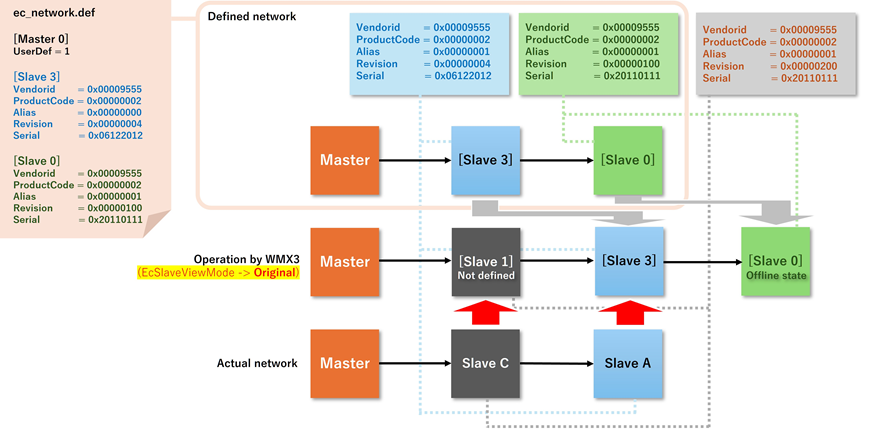
The following is a description of how EcPlatform recognizes the network when UserDef is 1.
Assume that the master connects to two slaves whose actual information are:
First slave:
Vendorid = 0x00009555
ProductCode = 0x00000002
Alias = 0x00000000
Revision = 0x00000004
Serial = 0x06122012
Second slave:
Vendorid = 0x00009555
ProductCode = 0x00000002
Alias = 0x00000001
Revision = 0x00000200
Serial = 0x20110111
In ec_network.def , UserDef is set to 1 and slave 0 and 1 are defined as follows:
…
UserDef = 1
[Slave 0]
Vendorid = 0x00009555
ProductCode = 0x00000002
Alias = 0x00000000
Revision = 0x00000004
Serial = 0x06122012

[Slave 1]
Vendorid = 0x00009555
ProductCode = 0x00000002
Alias = 0x00000001
Revision = 0x00000100
Serial = 0x20110111
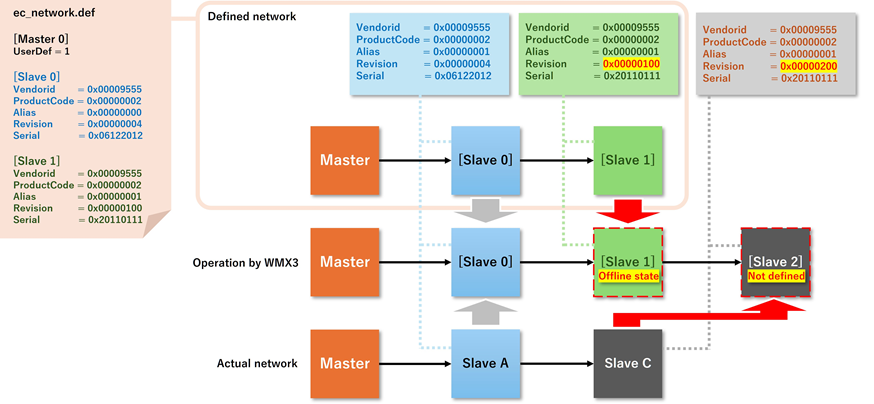
The only difference between the user defined information and the actual information is that [Slave 1] defines revision 0x00000100 but the actual revision of the slave is 0x00000200.
Start communication will succeed even though the second slave does not match the defined information. The master will insert an inaccessible slave in offline state into the defined position.
The unmatched slave will be recognized as a new slave outside the definition. In other words, even though there are only two slaves in the network, the master sees three slaves (two defined slaves and a new slave), with the defined [Slave 1] being inaccessible (offline).
The order of slaves that EcPlatform keeps in EcMasterInfo is as follows.
Slaves defined in ec_network.def are kept in the order in which they are defined in the file. This order can be different from the order on the actual network.
Slave IDs of slaves defined in ec_network.def are assigned the number defined as [Slave x]. The specification allows for the presence of unused ID numbers or for the ID numbers not to be in ascending order.
Slaves that are not defined in ec_network.def and are present in the actual network are given the youngest ID number not defined in [Slave x]. These slaves will also be listed after the defined slaves in the EcMasterInfo.
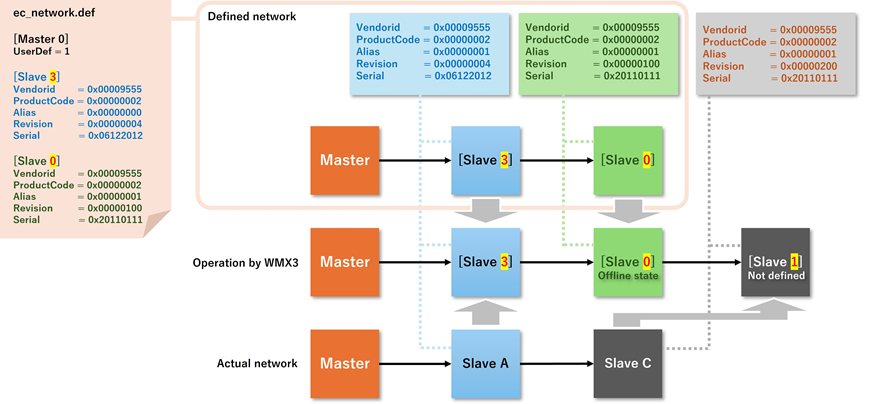
The UserDef function allows slaves scheduled to be hot-connected or not yet available to be inserted into the network while offline.
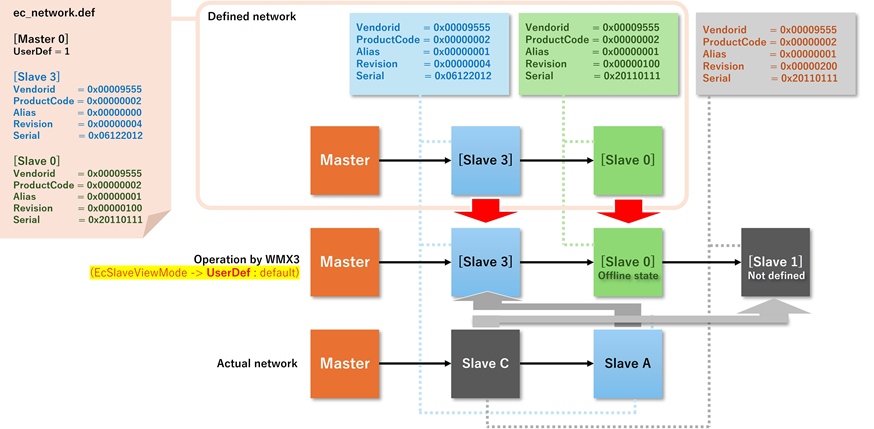
SetSlaveViewMode function allows the user to specify the actual network order in which the slaves are viewed through EcMasterInfo. The default is according to the user-defined order.
EcSlaveViewMode -> UserDef (default):
EcSlaveViewMode -> Original: