Version Numbers
The WMX3 product version has a unique number for each installer full package or patch installer. The product version can be found in the installer or in utilities such as WOS.
When WMX3 is installed by the installer full package or patch installer, the number will be updated.
In addition, detailed version numbers for each WMX3 component are assigned on a per-file basis.
For WMX3 product version numbers and module library numbers, the A and B numbers will match.
WMX3 Product Version
WMX3 Product Version is in the form A.BuE, and may contain additional qualifiers in the case of special releases.
Below is the specification explanation of the version number.
Digit |
Version Type |
Version Meaning |
What the user should do when the version is incremented |
|---|---|---|---|
A |
major version number |
The major version number of the product, fixed at 3 for WMX3. |
This number will not be updated for follow-on updates of the same product line. Migration to a new product with an update of this number typically requires an extensive user application redesign. |
B |
minor version number |
The minor version number of the product |
Check the compatibility of the user application and WMX3 API, and take appropriate measures for the user application if necessary. |
E |
update version number |
The update version number of the product |
Check the compatibility of the user application and WMX3 API, and take appropriate measures for the user application if necessary. |
The following figure shows an example of updating a product version number.
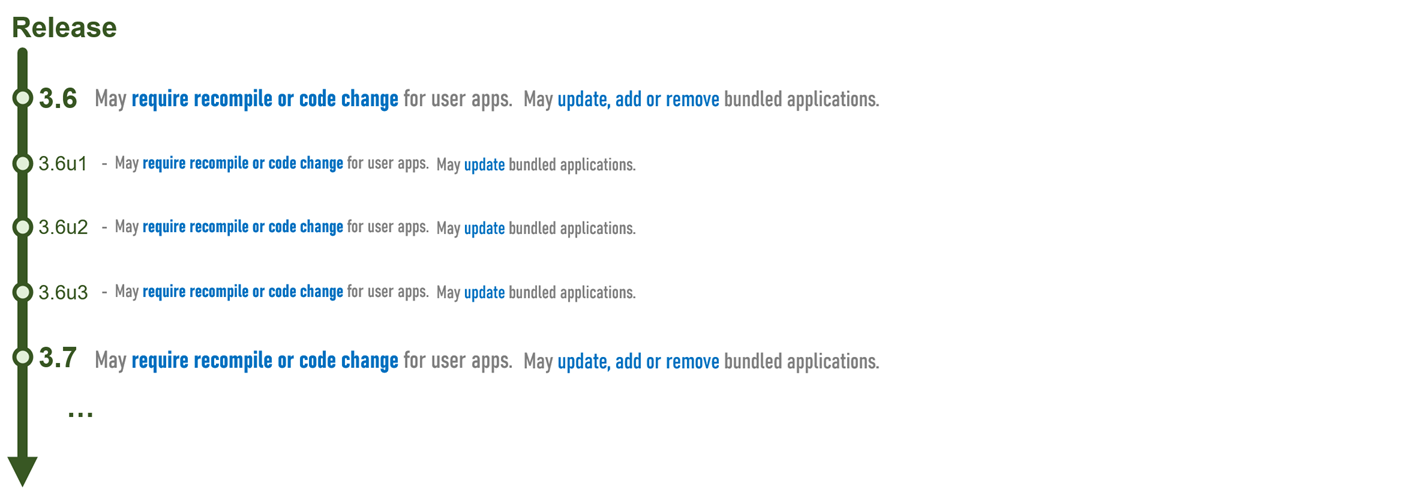
Note: No custom versions with additional modifiers will be released unless there is a special reason to do so.
Detailed version numbers for each WMX3 component
Module Version Number
There are two types of WMX3 modules: platform modules and motion modules (see Module.ini).
Both types of modules consist of the module RTDLL and the module libraries. The module RTDLL is the file that is loaded by the WMX3 engine when running the module. The module libraries contain the API function interfaces for the programming languages supported by that module.
For a module library to be able to control the module RTDLL through API functions, the major, minor, and revision version numbers of the module library must match those of the module RTDLL.
Below is the specification explanation of the version number.
Digit |
Version Type |
Version Meaning |
What the user should do when the version is incremented |
|---|---|---|---|
A |
major version number |
The major version number of the product, fixed at 3 for WMX3. This number corresponds to the product version A of WMX3. |
This number will not be updated for follow-on updates of the same product line. Migration to a new product with an update of this number typically requires an extensive user application redesign. |
B |
minor version number |
This number is used to manage the compatibility between WMX3Engine and engine-side module; it is updated by changes that cause incompatibility between WMX3Engine and engine-side module. Basically, this number corresponds to WMX3 product version B. |
Check the compatibility of the user application and WMX3 API, and take appropriate measures for the user application if necessary. |
C |
revision version number |
This number manages the compatibility between the API library and the engine-side module. It is updated whenever changes cause incompatibility between the API library and the engine-side module. |
Check the compatibility of the user application and WMX3 API, and take appropriate measures for the user application if necessary. |
D |
fix version number |
This number is used to represent bug fixes, enhancements, and adding some new interfaces that keeps compatibility between the API library and engine-side module. |
This number indicates that bug fixes and improvements have been made without losing compatibility with the user application. |
Note: Although C and D primarily address compatibility within a module, they also naturally reflect compatibility to users who utilize those libraries in their applications.
Note: It is recommended that each time a new version of the WMX3 library is released - that is, whether it increases C or D - applications that use the WMX3 library be rebuilt.
Even for backward-compatible changes, a rebuild ensures that the modified library and application are fully integrated and mitigates any subtle compatibility risks created by the change.
Rebuilds are recommended to ensure stability and compatibility, even when rebuilds are not theoretically required. These guidelines will help users avoid potential version mismatch issues.
The version number of the module RTDLL can be read by calling one of the following functions.
Module |
File Name (Module) |
Function |
|---|---|---|
CoreMotion |
CoreMotion.rtdll |
|
Log |
Log.rtdll |
|
ApiBuffer |
ApiBuffer.rtdll |
|
CyclicBuffer |
CyclicBuffer.rtdll |
|
Compensation |
Compensation.rtdll |
|
IO |
IO.rtdll |
|
Event |
Event.rtdll |
|
AdvancedMotion |
AdvancedMotion.rtdll |
|
UserMemory |
UserMemory.rtdll |
|
PMMotion |
PMMotion.rtdll |
|
EcPlatform |
EcPlatform.rtdll |
|
RtexPlatform |
RtexPlatform.rtdll |
RTEX::GetVersion |
MIIIPlatform |
MIIIPlatform.rtdll |
MIII::GetVersion |
CCLinkPlatform |
CCLinkPlatform.rtdll |
CCLink::GetVersion |
SimuPlatform |
SimuPlatform.rtdll |
The version number of the module library can be read by calling one of the following functions. These functions are static functions, and may be called without instantiating an object of the module class. For the WMX3Api.lib library, the API functions are directly executed by the engine, and thus the major, minor, and revision version number of the library must match those of the engine.
Module |
File Name (C++ Library) |
Function |
|---|---|---|
WMX3Api |
WMX3Api.lib |
|
CoreMotion |
CoreMotionApi.lib |
|
Log |
LogApi.lib |
|
ApiBuffer |
ApiBufferApi.lib |
|
CyclicBuffer |
CyclicBufferApi.lib |
|
Compensation |
CompensationApi.lib |
|
IO |
IOApi.lib |
|
Event |
EventApi.lib |
|
AdvancedMotion |
AdvancedMotionApi.lib |
|
UserMemory |
UserMemoryApi.lib |
|
PMMotion |
PMMotionApi.lib |
|
EcPlatform |
EcApi.lib |
|
RtexPlatform |
RtexApi.lib |
RTEX::GetLibVersion |
MIIIPlatform |
MIIIApi.lib |
MIII::GetLibVersion |
CCLinkPlatform |
CCLinkApi.lib |
CCLink::GetLibVersion |
SimuPlatform |
SimuApi.lib |
The engine version number can be obtained using the GetModulesInfo function. The engine version is contained in the returned engine.majorVersion, engine.minorVersion, engine.revisionVersion, and engine.fixVersion values.
IMDLL Version Number
The IMDLL (typically IMDLL.dll) has a version number of the form A.B.
A is the version number.
B is the revision number.
These version numbers are independent of the numbering scheme for the other files. The IMDLL file that is packaged with the installer should always be used.
The IMDLL version number can be obtained using the GetIMDllVersion function. It can also be obtained using the GetModulesInfo function, in which case the version numbers are contained in the returned engine.imlibVersion and engine.imlibRevision values.
Utility Version Number
Utility applications of WMX3 have version numbers as follows.
Utility |
Format |
Description |
|---|---|---|
WMX3 Console |
A.B.C.D |
The version number matches the installer version number, with C equal to the update number and D equal to 0. |