Overview
Trigger events allow more complex trigger conditions to be defined for trigger motion.
Up to maxTriggerEvents trigger events can be defined for each trigger motion. These events are defined using the TriggerEvents class.
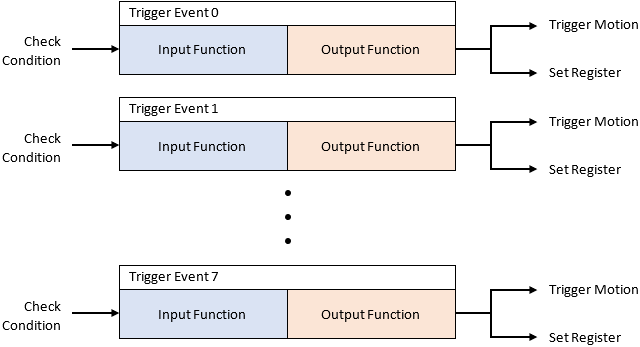
Each trigger event consists of an input function and an output function. The input function determines the condition that will trigger the event. The output function determines whether to execute the trigger motion or set a register bit when the condition is satisfied.
At the end of each communication cycle, the trigger events that are defined for each trigger motion are processed in order from index 0 to maxTriggerEvents-1. During the processing of each trigger event, the input function of the trigger event is evaluated, and the output function is executed based on the result.
The following figure shows the trigger events that can be defined for each trigger motion.
There are 8 register bits (numbered 0 to 7) that may be used to implement logic. These register bits are local to each individual trigger motion, and cannot be read by other trigger motions. Register bits can be used to define trigger conditions with more complex logic.
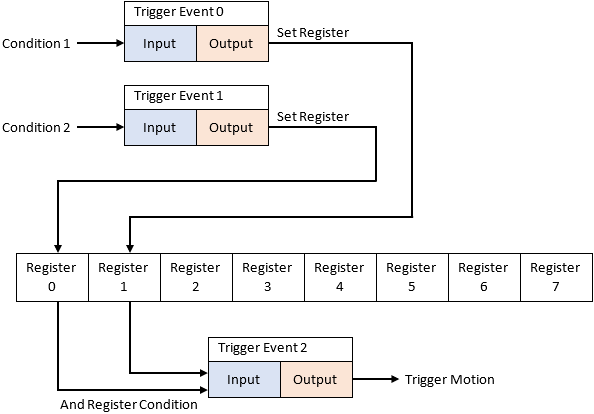
The following figure shows an example of using register bits to define a trigger motion that executes when two conditions are satisfied.
Trigger Events Example
The following code implements a trigger motion that will only start when two other axes have finished their motion. This example uses registers to implement the logic.
Motion::PosCommand pos;
TriggerEvents trig;

//Execute normal motion command for axis 0
pos.axis = 0;
pos.profile.type = ProfileType::Trapezoidal;
pos.profile.velocity = 10000;
pos.profile.acc = 10000;
pos.profile.dec = 10000;
pos.target = 15000;

wmxlib_CoreMotion->motion->StartMov(&pos);

//Execute normal motion command for axis 1
pos.axis = 1;
pos.target = 20000;

wmxlib_CoreMotion->motion->StartMov(&pos);

//Execute trigger motion command for axis 2
trig.numEvents = 3;

//Event 0: Set register 0 when the remaining time of axis 0 is zero
trig.event[0].inputFunction = TriggerEventInputFunction::RemainingTime;
trig.event[0].input.remainingTime.axis = 0;
trig.event[0].input.remainingTime.timeMilliseconds = 0;
trig.event[0].outputFunction = TriggerEventOutputFunction::SetReg;
trig.event[0].output.setReg.regNumber = 0;

//Event 1: Set register 1 when the remaining time of axis 1 is zero
trig.event[1].inputFunction = TriggerEventInputFunction::RemainingTime;
trig.event[1].input.remainingTime.axis = 1;
trig.event[1].input.remainingTime.timeMilliseconds = 0;
trig.event[1].outputFunction = TriggerEventOutputFunction::SetReg;
trig.event[1].output.setReg.regNumber = 1;

//Event 2: Start trigger motion when register 0 and register 1 are both set
trig.event[2].inputFunction = TriggerEventInputFunction::AndReg;
trig.event[2].input.andReg.regNumber[0] = 0;
trig.event[2].input.andReg.regNumber[1] = 1;
trig.event[2].outputFunction = TriggerEventOutputFunction::TriggerMotion;

pos.axis = 2;
pos.target = 10000;

wmxlib_CoreMotion->motion->StartMov(&pos, &trig);
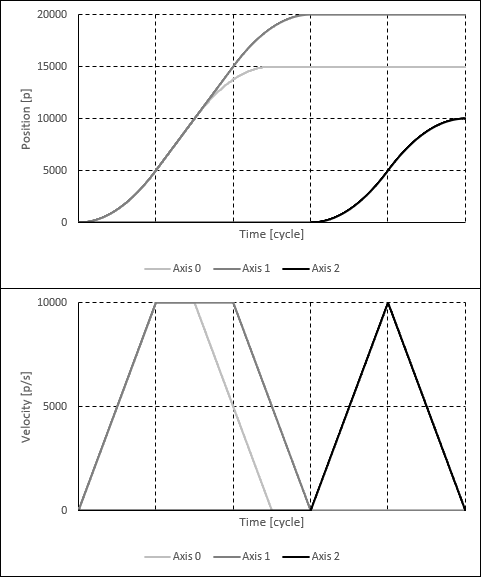
The following plots show the position and velocity of the axes when the above code is executed.