Command / Feedback Status
Saves the displacement and velocity of the axis, and based on this, the calculated position and velocity of the robot end effector, the position coordinate value of each axis, etc.
stateCommand is the command value (Command) for the displacement and velocity of each axis, and the rest of the data, such as the position and velocity of the robot end effector and the axis position, are also the results calculated based on this command value.
stateFeedback also has the same structure, and the displacement and velocity values of each axis are the actual values (Feedback), and the position, velocity, axis position, etc. of the robot end effector are also data calculated based on these actual values.

RobotState 를 구성하는 파라미터는 다음과 같습니다.
Robot ID |
|
|---|---|
Variable |
|
Type |
|
Maximum |
|
Minimum |
|
Default |
|
Enter the robot ID to acquire the data of the desired robot.
Axis Position |
|
|---|---|
Variable |
|
Type |
|
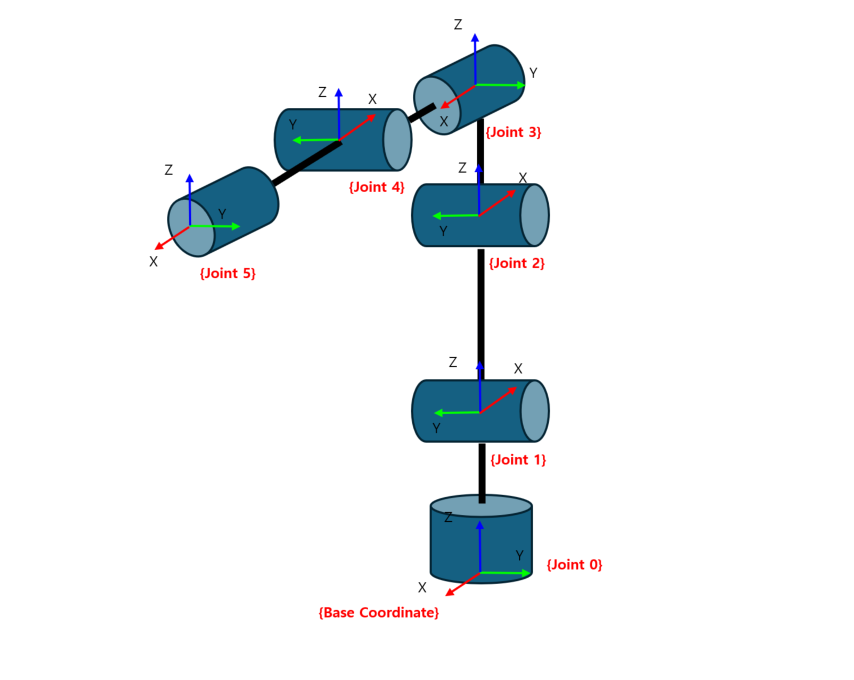
This is the value representing the position of each axis of the robot in Cartesian Coordinates. The reference is the Base Coordinate, and if workCoordinate is applied, the axis position value changes based on the changed coordinate system.
In the figure below, the position values of Joints 0-5, represented based on the Base Coordinate, are the jointPoses values.
Robot End Effector Position |
|
|---|---|
Variable |
|
Type |
|
This is the position value of the robot in Cartesian Coordinates. It is affected by the Work Coordinate and Tool Coordinate.
Robot Specific Posture |
|
|---|---|
Variable |
|
Type |
|
Maximum |
|
Minimum |
|
Default |
|
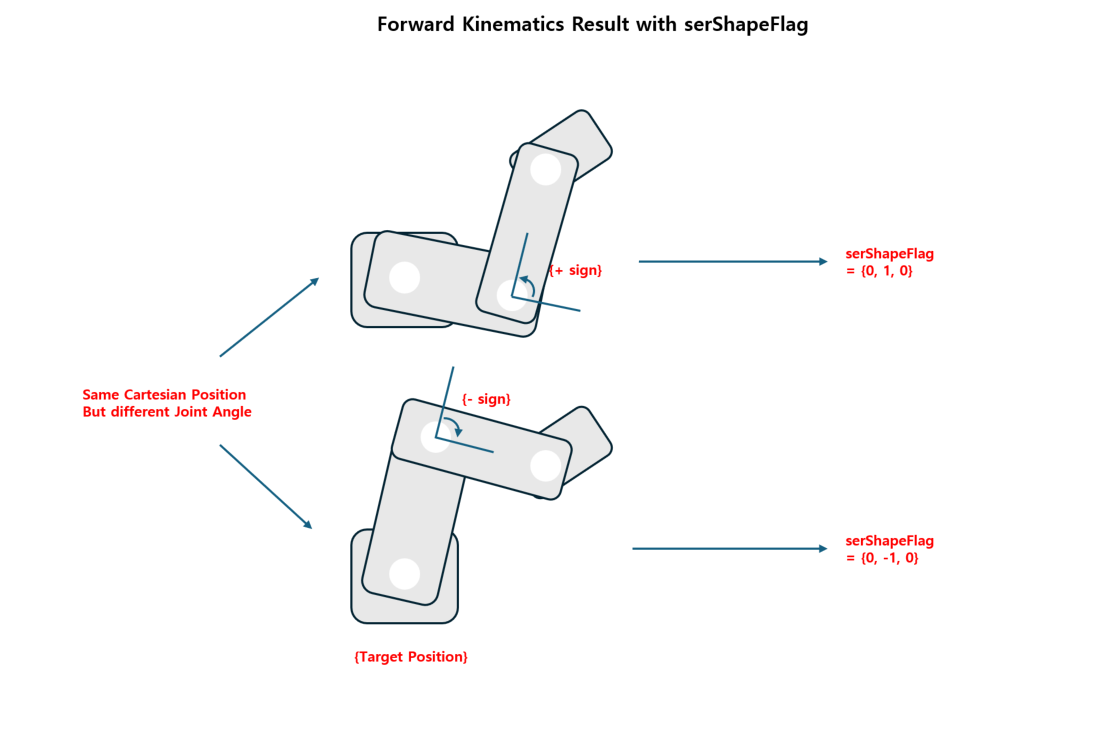
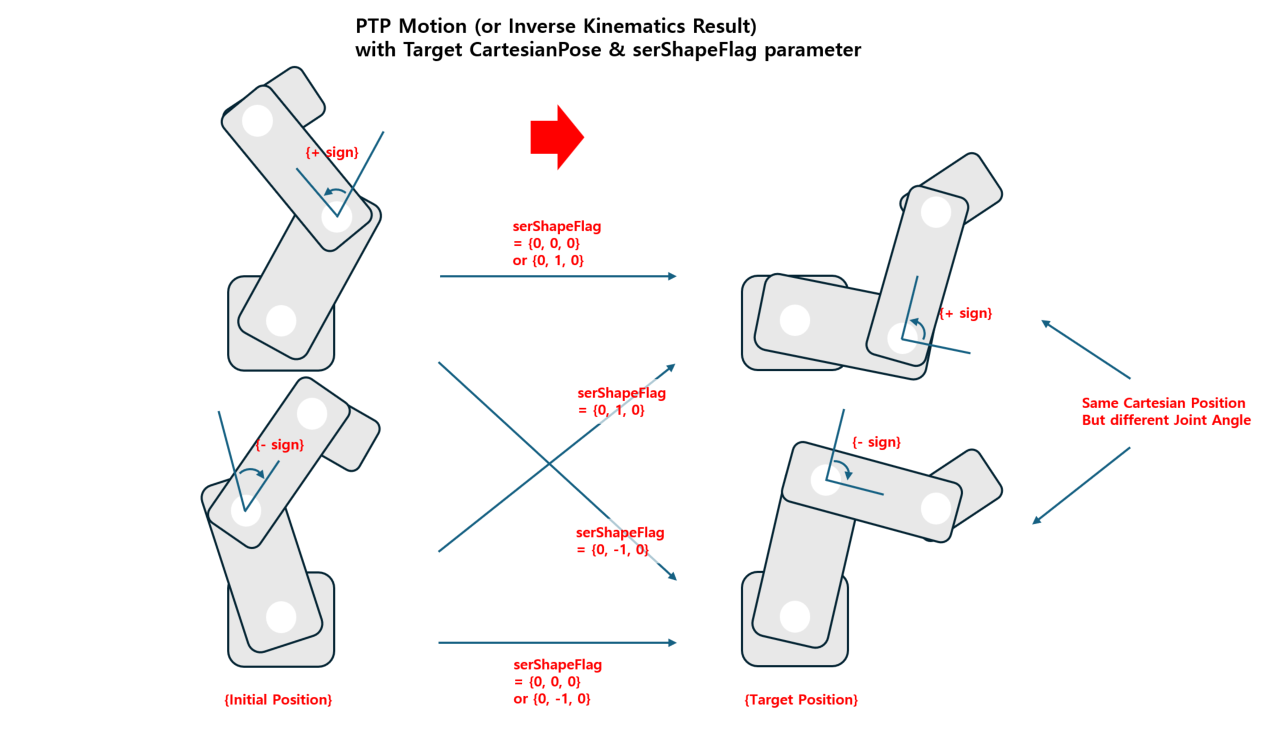
In Cartesian Coordinates, even with the same position coordinates, the robot’s posture (axis displacement value) can be different.
The flag to distinguish this difference in posture is serShapeFlag, which indicates the directionality of Shoulder, Elbow, and wRist.
For example, Elbow = -1 means a posture in which the value of the corresponding joint (the axis corresponding to the Elbow) is set in the negative direction.
Currently, this function is limited to the case where robotType is KINEMATICS_ROBOT_TYPE_SCARA_4_AXES, and is limitedly supported for the Elbow value.
Main situations where serShapeFlag is used
When using the function, → The serShapeFlag value of the calculated posture is output.
When calling the function, → Use serShapeFlag as an input value when you want to specify the desired posture direction.
When performing PTP motion using Cartesian coordinates, → It is used to clearly specify the target posture.
wmx3Api::coordinate::CartesianPose result;

char serFlag1[3] = { 0, 0, 0 };
char serFlag2[3] = { 0, 0, 0 };
double testJointAngle1[] = {180, 90, 0, 0, 0, 0};
double testJointAngle2[] = { -90, -90, 0, 0, 0, 0 };

scara.robotMotion.mKinematics.CalcForwardKinematics(scara.robotMotionParam.robotParam.robotId, testJointAngle1, result, serFlag1[0], serFlag1[1], serFlag1[2]);

scara.robotMotion.mKinematics.CalcForwardKinematics(scara.robotMotionParam.robotParam.robotId, testJointAngle2, result, serFlag2[0], serFlag2[1], serFlag2[2]);
Axis Displacement |
|
|---|---|
Variable |
|
Type |
|
Unit |
|
Default |
|
This is the displacement value of each axis of the robot.
Robot End Effector Velocity |
|
|---|---|
Variable |
|
Type |
|
This is the velocity value of toolPose.
Axis Velocity |
|
|---|---|
Variable |
|
Type |
|
Default |
|
This is the velocity value of each axis of the robot.