Tutorial 1: Creating a Project
This part covers the following.
Creating a C++ (Visual Studio) project to handle the WMX3 Robot module
Compiling a project including the WMX3 Robot module
1. Create a Blank Project
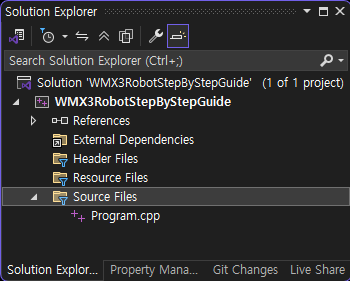
Create a blank C++ project as shown below.
2. Copy Properties / Settings Files
Copy the files below from the path where the sample code is installed to the same path as the created project. These are the project properties and settings files required for this tutorial.
Path : C:\Program Files\SoftServo\WMX3\Robot\Samples\CPP\WMX3RobotStepByStepGuide\common
File |
Description |
|---|---|
WMX3Win.props |
Project settings for using WMX3 related headers and libraries. |
RobotApi.props |
Project settings for using the WMX3 robot module. |
wmx_parameter_MZ07L.xml |
WMX3 settings for the robot model (example) used in the tutorial. |
robotParamXML_MZ07L.xml |
Settings for the WMX3 robot module for the robot model (example) used in the tutorial. |
3. Add Property Files
Add the WMX3Win.prop and RobotApi.prop files to the Property Manager.
WMX3Win.props contains basic settings for using WMX3. RobotApi.props contains additional settings for using the robot module.

4. Add Legacy Libraries (VS2015 or later)
If the compiler version is Visual Studio 2015 or later, add the following two libraries to the linker.
legacy_stdio_definitions.lib
legacy_stdio_wide_specifiers.lib
WMX3 uses legacy libraries based on Visual Studio 2012. This is necessary for compatibility.
5. Check Compilation
If the following main function compiles normally, the initial setup is complete.
#include <RobotMotionApi.h>
int main(int argc, const char argv[])
{
    wmx3Api::WMX3Api dev;
    wmx3Api::RobotMotion mz07lf(&dev);
    return 0;
}
※ Additional Processing
If you schedule the following processing as a Build Events > Post-Build Event in the project properties, you can reduce the effort of copying the essential library for project execution, IMDll.dll, from the WMX3 installation folder.
copy /y $(WMX3)\Lib\IMDll.dll $(TargetDir)
If you add the following syntax to Project Properties > Build Events > Post-Build Event, you can reduce the effort of copying the corresponding settings file to the same path as the executable file.
copy /y "$(ProjectDir)robotParamXML_MZ07L.xml" "$(TargetDir)"
copy /y "$(ProjectDir)wmx_parameter_MZ07L.xml" "$(TargetDir)"