Tutorial 7: CP Motion
This part covers the following.
Perform CPMotion of RobotMotion.
LineMotion
ArcMotion
SplineMotion
1. Sample Code
SampleCpLineMotionBaseFrame
int SampleCpLineMotionBaseFrame(wmx3Api::RobotMotion& robot, wmx3Api::RobotMotionParam& robotMotionParam)
{
    int ret = 0;
    wmx3Api::RobotStatus robotStatus;

    ret = robot.UpdateRobotStatus(robotMotionParam.robotParam.robotId, robotStatus);

    // Generate target pose
    wmx3Api::coordinate::CartesianPose targetPose(robotStatus.stateCommand.toolPose);
    targetPose.point.x += 100.0;
    targetPose.point.y += 0;
    targetPose.point.z += 0;

    // CP Line Motion Command(parameter, base frame)
    wmx3Api::TrajectoryMotionParam::TrajectoryLineMotionParam trajectoryParam(robotMotionParam.profile, targetPose);

    // Set CP Motion
    ret = robot.mKinematics.SetMotion(robotMotionParam.robotParam.robotId, trajectoryParam);

    // Start CP Motion
    ret = robot.mKinematics.StartMotion(robotMotionParam.robotParam.robotId);

    // Wait until motion finished
    ret = robot.mKinematics.Wait(robotMotionParam.robotParam.robotId);

    return ret;
}
Creates a CartesianPose class to specify the target coordinates/posture.
Creates a TrajectortyLineMotinoParam class to pass profile information and the target Pose.
Calls the SetMotion function to reserve a motion.
Calls the StartMotion function to execute the motion.
Calls the Wait function to wait until the motion is complete.

SampleCpLineMotionToolFrame
int SampleCpLineMotionToolFrame(wmx3Api::RobotMotion& robot, wmx3Api::RobotMotionParam& robotMotionParam)
{
    int ret = 0;
    wmx3Api::RobotStatus robotStatus;

    ret = robot.UpdateRobotStatus(robotMotionParam.robotParam.robotId, robotStatus);

    // Generate target pose
    wmx3Api::coordinate::CartesianPose targetPose;
    targetPose.point = wmx3Api::coordinate::Point3d(0, 0, -200);
    targetPose.rotation;

    // CP Line Motion Command(parameter, tool frame)
    wmx3Api::TrajectoryMotionParam::TrajectoryLineMotionParam trajectoryParam(robotMotionParam.profile, targetPose, true);

    // Set CP Motion
    ret = robot.mKinematics.SetMotion(robotMotionParam.robotParam.robotId, trajectoryParam);

    // Start CP Motion
    ret = robot.mKinematics.StartMotion(robotMotionParam.robotParam.robotId);

    // Wait until motion finished
    ret = robot.mKinematics.Wait(robotMotionParam.robotParam.robotId);

    return ret;
}
Creates a CartesianPose class to specify the target coordinates/posture.
Creates a TrajectortyLineMotinoParam class to pass profile information and the target Pose.
The third argument (isToolFrame) indicates whether to use the tool coordinate system as a reference.
Calls the SetMotion function to reserve a motion.
Calls the StartMotion function to execute the motion.
Calls the Wait function to wait until the motion is complete.

SampleCpArcMotionType3Points
int SampleCpArcMotionType3Points(wmx3Api::RobotMotion& robot, wmx3Api::RobotMotionParam& robotMotionParam)
{
    int ret = 0;
    wmx3Api::RobotStatus robotStatus;

    // Update the Robot Status(Get the current pose)
    ret = robot.UpdateRobotStatus(robotMotionParam.robotParam.robotId, robotStatus);

    // Start Test Case
    double radius = 50.0;
    wmx3Api::coordinate::CartesianPose currentPose(robotStatus.stateCommand.toolPose);

    // CP Line Motion Command(parameter, base frame)
    wmx3Api::coordinate::CartesianPose targetPose(currentPose);
    targetPose.point.x += (2 * radius);

    wmx3Api::coordinate::CartesianPose throughPose(currentPose);
    throughPose.point.x += radius;
    throughPose.point.y += radius;

    wmx3Api::coordinate::PoseArray poseArray = wmx3Api::coordinate::PoseArray();
    poseArray.numPoints = 1;
    poseArray.poseArray = new wmx3Api::coordinate::CartesianPose[poseArray.numPoints];
    poseArray.poseArray[0] = throughPose;

    // Set CP Motion
    wmx3Api::TrajectoryMotionParam::TrajectoryArcMotionParam trajectoryParam(robotMotionParam.profile, targetPose);
    ret = robot.mKinematics.SetMotion(robotMotionParam.robotParam.robotId, trajectoryParam, poseArray);

    // Start CP Motion
    ret = robot.mKinematics.StartMotion(robotMotionParam.robotParam.robotId);

    // Wait until motion finished
    ret = robot.mKinematics.Wait(robotMotionParam.robotParam.robotId);

    // Release user-allocated memory
    delete[] poseArray.poseArray;

    return ret;
}
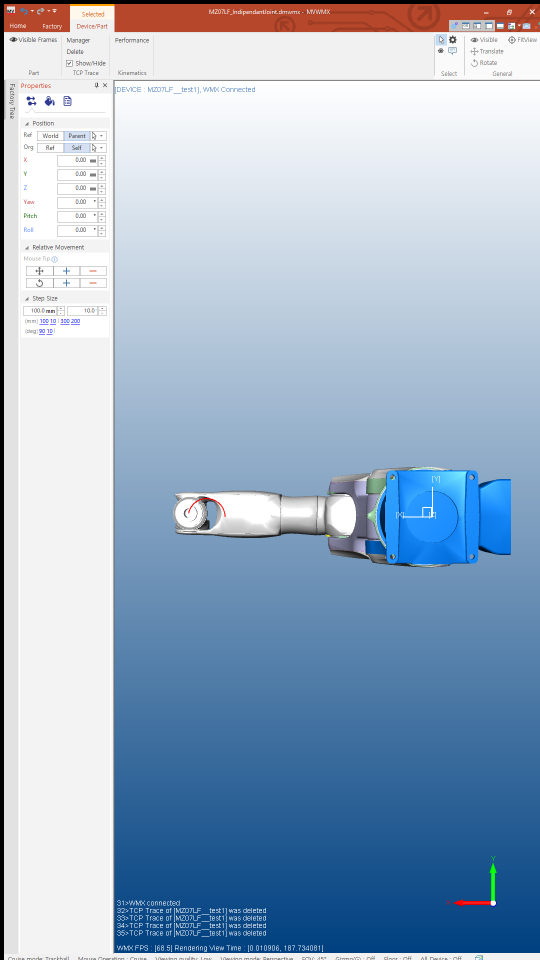
Performs Arc motion that passes through 3 points (current position, target position, via position).
The targetPose in the example above indicates the target Pose of the End effector.
The throughPose in the example above indicates the via Pose of the End effector.
Creates a TrajectoryArcMotionParam class to pass profile information and the target Pose.
Calls the SetMotion function to reserve a motion.
You can pass the via Pose in the form of a PoseArray class.
TrajectoryArcMotionParam refers to only the first element of PoseArray as the via Pose.
Calls the StartMotion function to execute the motion.
Calls the Wait function to wait until the motion is complete.
Releases the dynamically allocated memory.
SampleCpArcMotionTypePath
int SampleCpArcMotionTypePath(wmx3Api::RobotMotion& robot, wmx3Api::RobotMotionParam& robotMotionParam)
{
    int ret = 0;
    wmx3Api::RobotStatus robotStatus;

    // Update the Robot Status(Get the current pose)
    ret = robot.UpdateRobotStatus(robotMotionParam.robotParam.robotId, robotStatus);

    // Start Test Case
    wmx3Api::coordinate::CartesianPose currentPose(robotStatus.stateCommand.toolPose);
    //double rotAngle = wmx3Api::coordinate::Rotation::deg2rad(360);
    double rotAngle = 360;
    double radius = 50.0;

    // CP Line Motion Command(parameter, base frame)
    wmx3Api::coordinate::CartesianPose targetPose(currentPose);
    targetPose.point.x += (2 * radius);

    wmx3Api::coordinate::CartesianPose throughPose(currentPose);
    throughPose.point.x += radius;
    throughPose.point.y += radius;

    wmx3Api::coordinate::PoseArray poseArray = wmx3Api::coordinate::PoseArray();
    poseArray.numPoints = 1;
    poseArray.poseArray = new wmx3Api::coordinate::CartesianPose[poseArray.numPoints];
    poseArray.poseArray[0] = throughPose;

    // Set CP Motion
    wmx3Api::TrajectoryMotionParam::TrajectoryArcMotionParam trajectoryParam(robotMotionParam.profile, targetPose, rotAngle);
    ret = robot.mKinematics.SetMotion(robotMotionParam.robotParam.robotId, trajectoryParam, poseArray);

    // Start CP Motion
    ret = robot.mKinematics.StartMotion(robotMotionParam.robotParam.robotId);

    // Wait until motion finished
    ret = robot.mKinematics.Wait(robotMotionParam.robotParam.robotId);

    // Release user-allocated memory
    delete[] poseArray.poseArray;

    return ret;
}
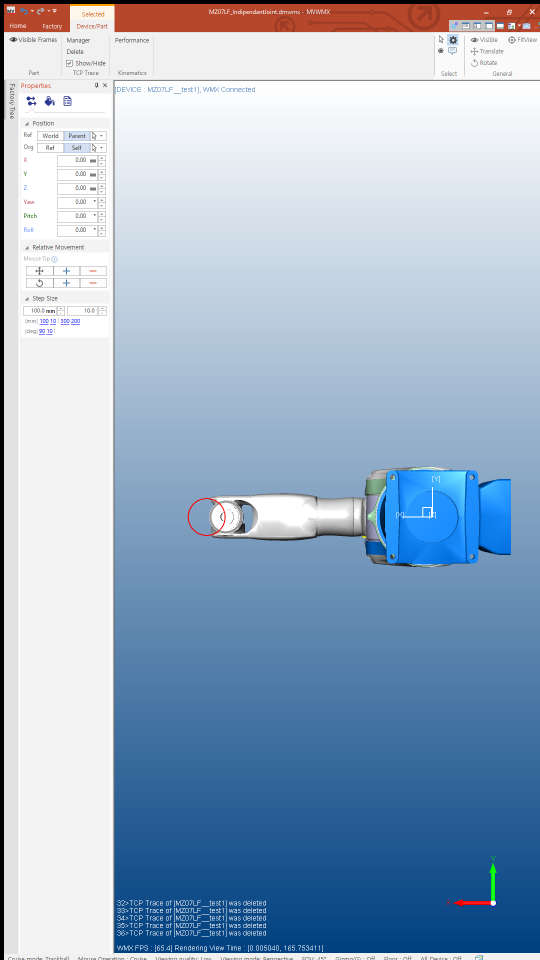
Performs Arc motion that rotates by a specific angle based on 3 points (current position, target position, via position).
The targetPose in the example above indicates the (on-path) target Pose of the End effector.
The throughPose in the example above indicates the (on-path) via Pose of the End effector.
Creates a TrajectoryArcMotionParam class to pass profile information and the (on-path) target Pose.
Calls the SetMotion function to reserve a motion.
You can pass the via Pose in the form of a PoseArray class.
TrajectoryArcMotionParam refers to only the first element of PoseArray as the via Pose.
Calls the StartMotion function to execute the motion.
Calls the Wait function to wait until the motion is complete.
Releases the dynamically allocated memory.
SampleCpSplineBMotion
int SampleCpSplineBMotion(wmx3Api::RobotMotion& robot, wmx3Api::RobotMotionParam& robotMotionParam)
{
    int ret = 0;
    double distance = 50.0;
    wmx3Api::RobotStatus robotStatus;

    // Update the Robot Status(Get the current pose)
    ret = robot.UpdateRobotStatus(robotMotionParam.robotParam.robotId, robotStatus);

    wmx3Api::coordinate::PoseArray poseArray = wmx3Api::coordinate::PoseArray();
    poseArray.numPoints = 5;
    poseArray.poseArray = new wmx3Api::coordinate::CartesianPose[poseArray.numPoints];
    poseArray.poseArray[0] = wmx3Api::coordinate::CartesianPose(robotStatus.stateCommand.toolPose);
    poseArray.poseArray[1] = wmx3Api::coordinate::CartesianPose(poseArray.poseArray[0]);
    poseArray.poseArray[1].point.y += distance;
    poseArray.poseArray[2] = wmx3Api::coordinate::CartesianPose(poseArray.poseArray[1]);
    poseArray.poseArray[2].point.x += (2 * distance);
    poseArray.poseArray[3] = wmx3Api::coordinate::CartesianPose(poseArray.poseArray[2]);
    poseArray.poseArray[3].point.y -= (2 * distance);
    poseArray.poseArray[4] = wmx3Api::coordinate::CartesianPose(poseArray.poseArray[3]);
    poseArray.poseArray[4].point.x -= (2 * distance);

    // Set CP Motion
    wmx3Api::TrajectoryMotionParam::TrajectoryBSplineMotionParam trajectoryParam(robotMotionParam.profile);
    ret = robot.mKinematics.SetMotion(robotMotionParam.robotParam.robotId, trajectoryParam, poseArray);

    // Start CP Motion
    ret = robot.mKinematics.StartMotion(robotMotionParam.robotParam.robotId);

    // Wait until motion finished
    ret = robot.mKinematics.Wait(robotMotionParam.robotParam.robotId);

    // Release user-allocated memory
    delete[] poseArray.poseArray;

    return ret;
}
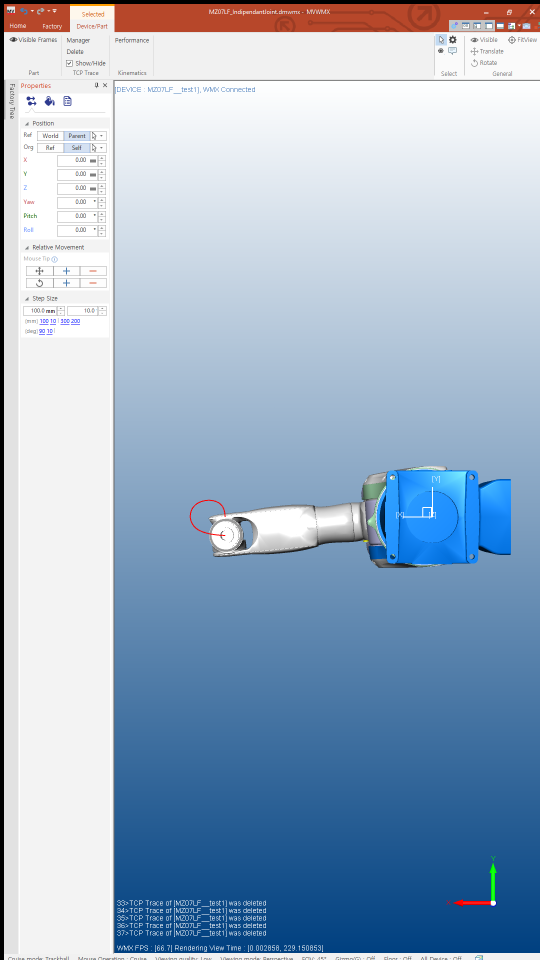
Performs a motion that smoothly connects multiple Poses.
It does not necessarily pass through the specified coordinates.
Creates a TrajectoryArcMotionParam class to pass profile information.
Calls the SetMotion function to reserve a motion.
You can pass the via Pose in the form of a PoseArray class.
Calls the StartMotion function to execute the motion.
Calls the Wait function to wait until the motion is complete.
Releases the dynamically allocated memory.
SampleCpSplineCMotion
int SampleCpSplineCMotion(wmx3Api::RobotMotion& robot, wmx3Api::RobotMotionParam& robotMotionParam)
{
    int ret = 0;
    double distance = 50.0;
    wmx3Api::RobotStatus robotStatus;

    // Update the Robot Status(Get the current pose)
    ret = robot.UpdateRobotStatus(robotMotionParam.robotParam.robotId, robotStatus);

    wmx3Api::coordinate::PoseArray poseArray = wmx3Api::coordinate::PoseArray();
    poseArray.numPoints = 5;
    poseArray.poseArray = new wmx3Api::coordinate::CartesianPose[poseArray.numPoints];
    poseArray.poseArray[0] = wmx3Api::coordinate::CartesianPose(robotStatus.stateCommand.toolPose);
    poseArray.poseArray[1] = wmx3Api::coordinate::CartesianPose(poseArray.poseArray[0]);
    poseArray.poseArray[1].point.y += distance;
    poseArray.poseArray[2] = wmx3Api::coordinate::CartesianPose(poseArray.poseArray[1]);
    poseArray.poseArray[2].point.x += (2 * distance);
    poseArray.poseArray[3] = wmx3Api::coordinate::CartesianPose(poseArray.poseArray[2]);
    poseArray.poseArray[3].point.y -= (2 * distance);
    poseArray.poseArray[4] = wmx3Api::coordinate::CartesianPose(poseArray.poseArray[3]);
    poseArray.poseArray[4].point.x -= (2 * distance);

    // Set CP Motion
    wmx3Api::TrajectoryMotionParam::TrajectoryCSplineMotionParam trajectoryParam(robotMotionParam.profile);
    ret = robot.mKinematics.SetMotion(robotMotionParam.robotParam.robotId, trajectoryParam, poseArray);

    // Start CP Motion
    ret = robot.mKinematics.StartMotion(robotMotionParam.robotParam.robotId);

    // Wait until motion finished
    ret = robot.mKinematics.Wait(robotMotionParam.robotParam.robotId);

    // Release user-allocated memory
    delete[] poseArray.poseArray;

    return ret;
}
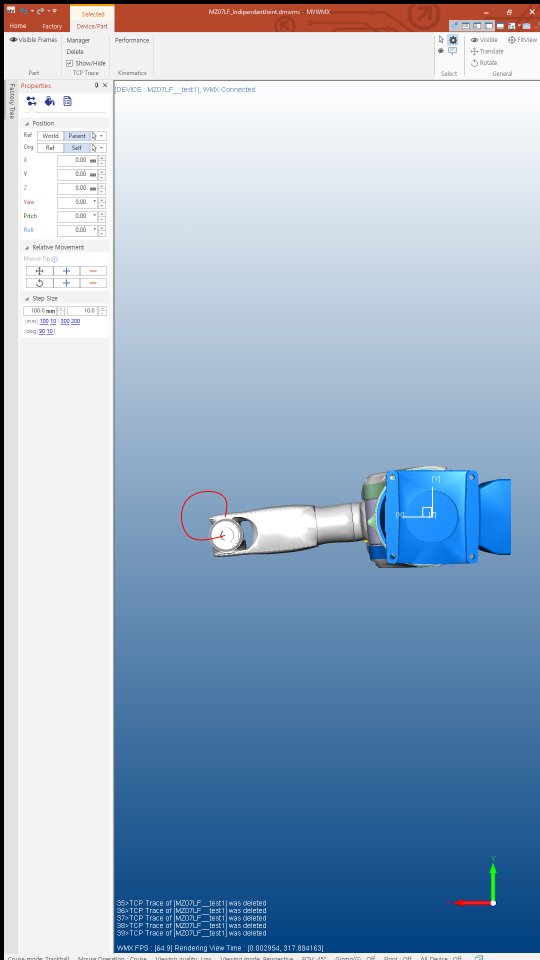
Performs a motion that smoothly passes through multiple Poses.
Creates a TrajectoryArcMotionParam class to pass profile information.
Calls the SetMotion function to reserve a motion.
You can pass the via Pose in the form of a PoseArray class.
Calls the StartMotion function to execute the motion.
Calls the Wait function to wait until the motion is complete.
Releases the dynamically allocated memory.
main
int main(int argc, const char* argv[])
{
    int ret = 0;
    wmx3Api::WMX3Api dev;
    wmx3Api::RobotMotion robot(&dev);
    wmx3Api::RobotMotionParam robotMotionParam;
    wmx3Api::RobotStatus robotStatus;
    const double initialJointDegree[] = { 0, 0, 0, 0, -90, 0 };

    // Initialization
    ret = InitWMX(dev);
    ret = InitRobotSystem(robot, robotMotionParam);
    ret = InitRobotPose(robot, robotMotionParam, initialJointDegree);

    printf("Start CpLineMotionBaseFrame\n");
    ret = SampleCpLineMotionBaseFrame(robot, robotMotionParam);
    ret = InitRobotPose(robot, robotMotionParam, initialJointDegree);

    printf("Start CpLineMotionToolFrame\n");
    ret = SampleCpLineMotionToolFrame(robot, robotMotionParam);
    ret = InitRobotPose(robot, robotMotionParam, initialJointDegree);

    printf("Start CpArcMotionType3Points\n");
    ret = SampleCpArcMotionType3Points(robot, robotMotionParam);
    ret = InitRobotPose(robot, robotMotionParam, initialJointDegree);

    printf("Start CpArcMotionTypePath\n");
    ret = SampleCpArcMotionTypePath(robot, robotMotionParam);
    ret = InitRobotPose(robot, robotMotionParam, initialJointDegree);

    printf("Start CpSplineBMotion\n");
    ret = SampleCpSplineBMotion(robot, robotMotionParam);
    ret = InitRobotPose(robot, robotMotionParam, initialJointDegree);

    printf("Start CpSplineCMotion\n");
    ret = SampleCpSplineCMotion(robot, robotMotionParam);
    ret = InitRobotPose(robot, robotMotionParam, initialJointDegree);

    printf("End of program.\n");

    return 0;
}
Calls the previously declared/defined main function.